Basics of Redux
- Redux and Flux
actions,reducers, andstore
The next step is to log a user in after signup. We're going to handle this with Redux, so now is a good time to go over the basics. If you are not already familiar with Redux, I highly recommend checkout out these 30 free videos sponsored by egghead.io. If you are familiar with Redux, skip ahead to the "Connecting Redux" section.
What is Redux?
To really understand Redux, you must first understand state. Think of state as the current status of your app. Imagine you're Facebook. You are currently logged in, you have two chat windows open, and you have just launched a modal to upload a new picture.
To generalize, the state of your app could be:
{ currentUser: "username", chat: [ { with: "friend1"}, { with: "friend2"} ], modal: true, imageUrl: false}If you wanted to replicate the exact status of this page at this point in time, all you have to do is set your state to all of the necessary conditions. This is extremely powerful, especially when used in conjunction with Redux.
Redux consists of actions, reducers, and a store. The concepts around actions and store are easy to understand--the reducers are a little bit more complicated, but still not especially difficult, and it will become much more clear once we start implementing them.
The basic concept is that Redux keeps your state at the highest level of your app, and that every component within your app gets its state from that high-level container, whereas a normal React app will have local state.
TODO image of local state v. redux
Basics of Flux
Before we go into Redux, we should really discuss Flux. Flux is one of the major innovations behind React, and it enforces uni-directional data flow.
Rather than go into detail here, check out this video where Facebook explains the origins of Flux and how it works.
Back in the old days of the internet, we used something jQuery to trigger events that would directly manipulate the DOM. For example, we might have a button in one part of our app that appends a new item to a list, or toggle a class on a particular DOM element.
These events were not tied together in any meaningful way, and any data these components received came from sporadic sources. Tracking down the origin of certain events and data was notoriously difficult.
Flux is an attempt at solving that problem. Rather than allowing your models to send data to many views, Flux enforces hierarchy so your views cannot directly make changes to your data.
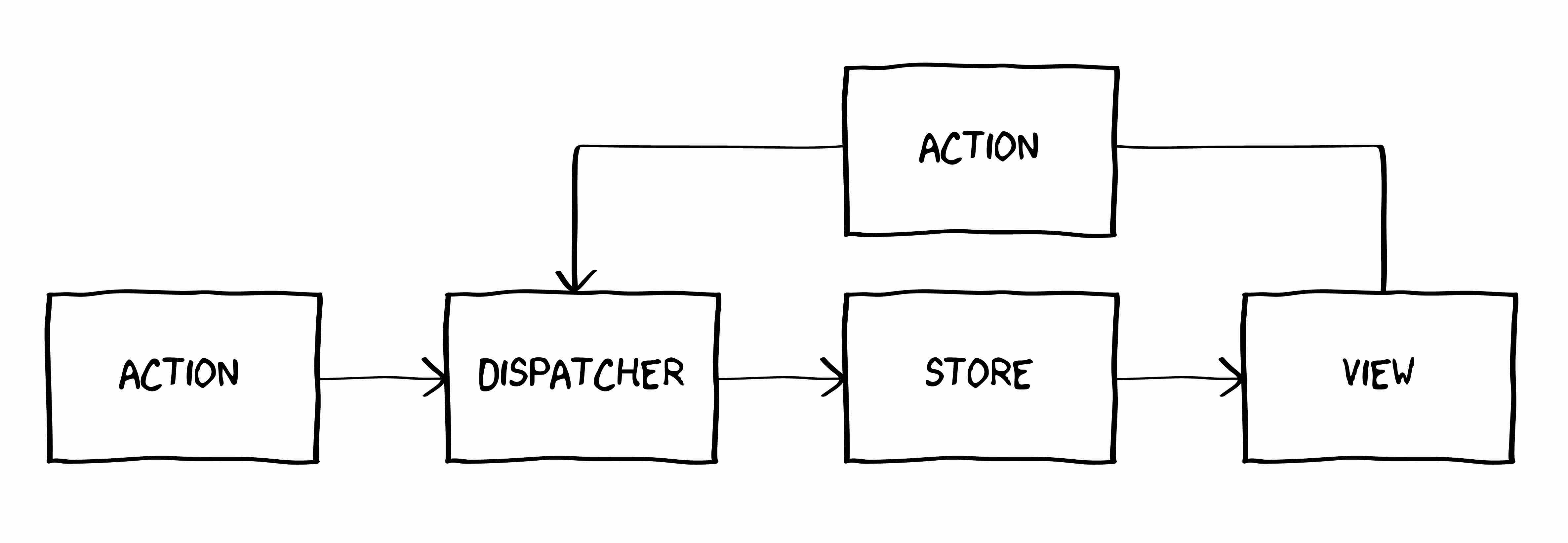
We will be using Redux, which is a library that is an implementation of Flux.
Working with data
Every interaction our app will have with our server will be through Redux, and all of our data is passed in to our components through Redux, so this is a good time to talk about how to handle data more generally.
A major long-term problem with web APIs, and one not solved by Redux or Flux, is "over-fetching". Twitter is an example of this, because their API returns a deeply-nested object which always contains more data than your app needs.
GraphQL and Falcor are different approaches of solving this problem. They are more efficient, but require more boilerplate to set up.
GraphQL allow you to tell the server specifically what you want and return only that. It is also much more declarative and the server figures out the most efficient way to prepare your data. It also takes more boilerplate code and is only really necessary for apps that have such scale that they need to use it.
At this point in our app, GraphQL is overkill, and we'll just stick to a simple JSON API. Refactoring to use GraphQL and Relay is very doable and we can cross that bridge if it becomes necessary.
With a JSON API, you send a request to a server at a specific url with the parameters that the API needs to complete the request. An example request might look like the code below, where we are simply requesting data from http://github.com/data.json.
fetch("http://github.com/data.json", { method: "GET",}) .then(function (res) { // Response here }) .catch(function (err) { // If error, error here })You've probably heard a lot about "REST" APIs. People will argue endlessly about the real definition of what it means to be "RESTful", and that's because REST does not have an official definition--it's a description of an architecture style, not a protocol.
But the important part is that REST APIs are stateless, so you pass the state to the API as parameters. For example, if you want to create a new user with a REST API, you pass the user details as the parameters to the endpoint. Most of the APIs you've dealt with are REST APIs, so the concept should be at least implicitly familiar.
fetch("http://learnphoenix.io/create", { method: "POST", body: "first=Alan&last=Turing&password=badpassword1",}) .then(function (res) { // Response here }) .catch(function (err) { // If error, error here })Our Phoenix backend is a REST API, and we will use Phoenix to handle requests that we send from our frontend, as we have already demonstrated when creating a user.
Basics of Redux
Redux is Flux-ish, with some additional features. The code behind Redux is surprisingly small, and it's really just a well-thought-out design pattern. The main principle of Redux is that you don't keep local state in your components--all of your state is held in one place at the highest-possible level of your app and passed down.
The way you use it is to wrap your entire app in a Redux Provider (explained in the next lesson) so that you can later connect each of your React components to this global data source (called a store).
The store is dumb. It's just an object that holds your state.
In order to process the data and make any changes to your data, you need to pass it through a series of reducers. These reducers are actually quite simple and reduce is an important function in functional programming.
If you are not familiar with what a reducer does, think of it as taking a long list of information and applying some transformation to each item in order. For example, say you have a list of numbers:
var list = [3, 1, -3, 5, 1]If you wanted to combine all of these values into a single value by adding them you could write a for loop to go over each of them, but that would not be very efficient. Instead, you can write a reducer that takes in the previous and current values as parameters and combines them within the reduce function.
var list = [3, 1, -3, 5, 1]var output = list.reduce(function (previous, current) { return previous + current})console.log(output) // -> 7Now, think of this in terms of Redux. Let's say we have a list of actions:
var list = [ { modal: open }, { modal: close }, { modal: open }, { chat: { name: "Eric", isOpen: true, }, }, { chat: { name: "Eric", isOpen: false, }, }, { chat: { name: "John", isOpen: true, }, },]What is the current status of this app? Is the modal open or closed? Who has an active chat window? As you will see when we start building our reducers, we can reduce a list of actions to the current state of the application.
Reducers listen to actions and mutates some piece of state based on the action.
For example, in a "todo" app, the action might be something like "create a new list item" or "mark as completed". The action passes any relevant data to the reducer, which changes the current state of the app to reflect the change that the action wanted made. "Mark as completed", for example, would change the specific item in your state and change the completed key to true.
Whenever the old state does not equal the new state, Redux will fire all of the event listeners and update all of the data in your app that was listening for something that got changed. This means that if you changed something in the todo list, your profile page would not necessarily need to be updated because it does not contain any data related to the todo list.
action is a way to trigger those reducers. They are, by default, synchronous. Since much of what you will be doing in a web app is asynchronous, you will quickly need some additional plugins, such as thunk and potentially other middleware.
Actions allow you to be more declarative. If you are not familiar with the difference between declarative and imperative, declarative means saying what you want, while imperative means describing how you will do it. For example, a declarative approach to data fetching would be something like GraphQL, in which you tell your backend what data you want and GraphQL sorts out the details of how to get that data for you.
Setting up Redux
The first thing we need to do is add redux as a dependency, as well as several other Redux-related dependencies.
$ npm install --save redux react-redux react-router-reduxThe react-redux module binds Redux to React and is necessary to get Redux working with React. The redux module contains all of the core functionality that we need. The react-router-redux wraps our react-router so we can keep track of the state of our routes--without this, our routes are considered a side-effect.
We're going to keep all of our Redux-related files in a new app/redux directory. Eventually we will have too many actions and reducers to fit in a single file, but that is easy to refactor and we can do that when it becomes necessary.
$ mkdir app/reduxWithin this directory, we will have three files: actions.js, reducers.js, and store.js.
$ touch app/redux/{actions,reducers,store}.jsWe will go over each of these in more detail in the next section.
Previous: Connect the APINext: Actions, Reducers, and Store